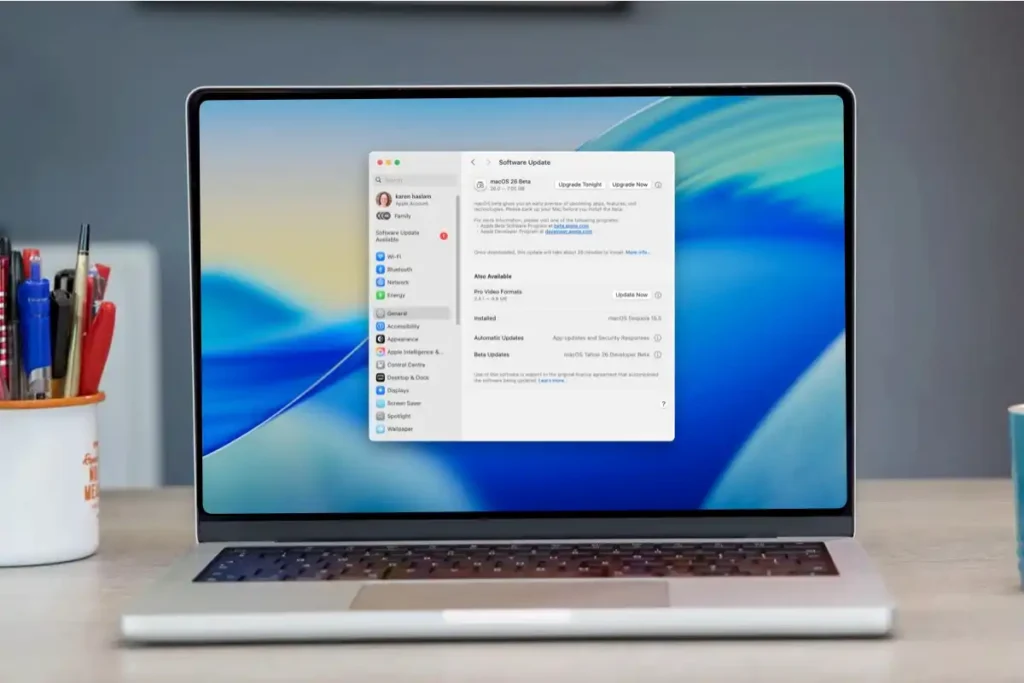
Introduction
In the fast-paced world of technology, operating systems (OS) are constantly evolving. Before a new OS version reaches the general public, it often goes through beta testing. Beta OS versions allow users to experience upcoming features, test performance improvements, and provide feedback that shapes the final release. While exciting, running a beta OS comes with its own set of benefits and risks.
What Are Beta OS Versions?
A beta OS version is a pre-release version of an operating system made available to select users outside the core development team. Unlike stable releases, beta versions are not fully polished—they often contain bugs, unfinished features, and potential security vulnerabilities. The goal is to gather real-world feedback from users in diverse environments to identify and fix issues before the official release.
Why Companies Release Beta Software
Companies release beta versions to:
- Test Software in Real-World Conditions – Internal testing can’t cover every device or usage scenario. Beta testers help identify issues in varied hardware and software environments.
- Collect User Feedback – Beta programs allow companies to understand how users interact with new features and make improvements accordingly.
- Build Hype and Engagement – Offering early access generates excitement among enthusiasts and helps shape the community around the OS.
- Identify Critical Bugs Early – Catching major bugs before a stable release reduces support costs and protects the company’s reputation.
Understanding Beta Operating Systems
Beta OS versions are part of a software development lifecycle that typically includes alpha, beta, and stable releases. Each stage has a different purpose and target audience.
Difference Between Alpha, Beta, and Stable Releases
- Alpha – Early-stage software that is usually unstable and intended for internal testing only. Features are incomplete, and bugs are expected.
- Beta – A pre-release version that is more stable than alpha. Beta releases are shared with external testers to find issues that internal teams may have missed.
- Stable – The final, polished version of the OS intended for everyday users. It has undergone thorough testing and is considered reliable for general use.
Examples of Beta OS Programs
Some well-known beta programs include:
- Windows Insider Program – Allows Windows users to test upcoming versions of Windows before general release.
- macOS Beta – Apple offers beta access to developers and public testers for the latest macOS features.
- Android Beta Program – Google releases beta versions of Android to test new features across different devices.
Pros of Running Beta OS Versions
Running a beta OS can be thrilling for tech enthusiasts, developers, and early adopters. Some of the key benefits include:
Early Access to New Features
Beta versions allow users to explore features before they are officially released, giving a sneak peek into the future of the OS.
Opportunity to Test Upcoming Technologies
Developers and tech enthusiasts can experiment with new technologies, APIs, and tools, preparing apps and services for the final release.
Ability to Provide Feedback to Developers
Beta testers can report bugs, suggest improvements, and influence the final version of the OS. This collaboration helps companies release a more stable product.
Learning and Development Opportunities
Running a beta OS provides hands-on experience with cutting-edge technology, helping users improve their technical skills and stay ahead in the tech world.
Cons of Running Beta OS Versions
While beta OS versions offer exciting opportunities to explore new features, they also come with significant risks that users must consider before installation. Understanding these drawbacks can help you make an informed decision.
System Instability and Bugs
Beta software is inherently unstable. Even after rigorous internal testing, beta OS versions often contain bugs that can lead to unexpected system crashes, freezes, or application errors. Tasks as simple as opening apps, saving files, or connecting peripherals may fail unexpectedly. For users relying on their computer for work or daily productivity, these interruptions can be frustrating and disruptive.
Compatibility Issues with Apps and Drivers
Many apps, drivers, and peripheral devices are optimized for stable OS versions. Running a beta OS may result in software conflicts, crashes, or malfunctioning hardware. For instance, printer drivers, graphics cards, or specialized software may not function properly until developers release updates compatible with the beta version. Users might find themselves unable to complete important tasks if critical applications fail to run.
Possible Data Loss or Security Risks
Beta OS versions are still under development, meaning that bugs or incomplete features can sometimes lead to data corruption or loss. Features such as file management, backup utilities, or system restore tools may not work as expected. Additionally, beta releases may not have all the security patches or hardened features present in stable releases, leaving devices more vulnerable to malware, phishing attacks, or unauthorized access.
Performance Problems and Battery Drain
Because beta software is not fully optimized, it can put additional strain on system resources. Users may notice slower performance, increased CPU or memory usage, and shorter battery life on laptops and mobile devices. Tasks that normally run smoothly on a stable OS may lag, and multitasking can become more cumbersome, making the device less reliable for daily use.
Who Should Consider Using Beta OS Versions?
Despite the risks, beta OS versions can be valuable tools for certain users. These groups are better equipped to handle potential issues and make the most of early access to new technology.
Developers and Testers
Software developers and quality assurance testers benefit greatly from beta OS programs. By using the beta version, developers can test their applications against upcoming changes, identify compatibility issues, and ensure their software will work seamlessly when the OS reaches stable release. Testers can report bugs and suggest improvements, directly influencing the development process.
Tech Enthusiasts
Early adopters and technology enthusiasts enjoy exploring new features before the general public. Beta OS versions give them the chance to experience cutting-edge technologies, experiment with system customization, and provide feedback to developers. For these users, the excitement of early access often outweighs the risks of instability.
IT Professionals
IT professionals, especially those in enterprise environments or responsible for managing multiple devices, can use beta versions to prepare for upcoming changes. Testing beta OS releases in a controlled environment allows IT teams to plan updates, identify potential issues with enterprise software, and ensure a smooth transition when the stable version becomes available.
Running a beta OS is a trade-off between early access to innovation and potential instability. While developers, testers, tech enthusiasts, and IT professionals can leverage beta versions effectively, everyday users or those relying on their devices for critical tasks are generally better off waiting for stable releases.
Who Should Avoid Beta OS Versions?
While beta OS versions are exciting for tech enthusiasts and developers, they are not suitable for everyone. Certain users and scenarios require stability and reliability, making beta releases a risky choice.
Everyday Users
If you primarily use your device for daily tasks—like browsing, streaming, or social media—beta OS versions can introduce unnecessary complications. Bugs, crashes, or feature changes may disrupt normal usage and cause frustration. For most everyday users, waiting for the stable release ensures a smoother, more reliable experience.
Work or Business Computers
Business environments demand stability, security, and compatibility with essential software. Running a beta OS on a work computer can lead to application failures, file corruption, or workflow interruptions. Employees relying on devices for client work, presentations, or financial operations should avoid beta versions to prevent costly errors.
Systems with Critical Data
Beta OS versions can occasionally cause data loss or corruption, even with careful use. Devices containing sensitive or irreplaceable information—such as personal documents, family photos, or professional databases—should remain on stable OS versions. Even a single crash or bug in a beta build can compromise critical files.
Tips for Safely Using Beta Operating Systems
For those who choose to explore beta OS versions despite the risks, following safety precautions can significantly reduce potential problems.
Install on a Secondary Device
Whenever possible, install the beta OS on a secondary device rather than your main computer or phone. This ensures that if the beta causes instability, your primary device remains fully functional and reliable. Virtual machines or partitioned drives can also be effective ways to test beta software safely.
Always Back Up Important Data
Before installing a beta OS, back up all important files and system configurations. Cloud storage, external hard drives, or backup software can help protect data in case the beta OS malfunctions. Regular backups during beta testing are also crucial, as updates may occasionally overwrite or corrupt files.
Monitor Known Issues and Updates
Stay informed about known bugs, crashes, and issues reported by the beta program. Developers often release frequent updates to address these problems. Being aware of potential risks can help you avoid scenarios that might compromise stability or security.
Be Prepared to Roll Back
Even with precautions, a beta OS can fail in unexpected ways. Familiarize yourself with the rollback process or have a clean, stable OS installation ready. This preparation ensures that you can return to a stable environment quickly if the beta version becomes unusable or causes significant problems.
Following these guidelines allows tech enthusiasts and developers to enjoy beta OS features safely while minimizing the risk of data loss, instability, or performance issues.
How to Install Beta OS Versions
Installing a beta OS version is an exciting way to experience new features early, but it requires careful planning to avoid data loss or system issues. Following official procedures and understanding system requirements are key to a smooth experience.
Joining Official Beta Programs
The safest way to access beta OS versions is through official beta programs provided by the OS developer. These programs are designed to manage risk and provide support resources for testers. Examples include:
- Windows Insider Program – Offers early builds of Windows for testing and feedback.
- Apple Beta Software Program – Provides macOS and iOS beta releases for developers and public testers.
- Android Beta Program – Allows Android users to test upcoming versions on compatible devices.
Joining official programs ensures that you receive reliable updates, documentation, and a structured path to revert to stable releases if needed.
System Requirements and Precautions
Before installing a beta OS, verify that your device meets the minimum system requirements. Beta versions may require more storage, RAM, or newer hardware than your current stable OS. Additionally, consider the following precautions:
- Backup all critical files to cloud storage or external drives.
- Ensure that important applications and drivers are compatible with the beta version.
- Understand the rollback or clean installation process in case the beta OS becomes unstable.
Steps to Enroll and Install
While steps vary depending on the platform, the general process is:
- Sign Up for the Beta Program – Register using your official account (Microsoft, Apple, or Google).
- Confirm Device Compatibility – Check that your hardware meets the beta requirements.
- Enroll Your Device – Follow program instructions to add your device to the beta testing group.
- Download the Beta OS – Use official channels to download the beta build.
- Install and Configure – Follow on-screen instructions, restart as needed, and ensure proper device setup.
- Check for Updates Regularly – Beta OS versions often receive frequent patches; install updates promptly to maintain functionality and security.
How to Return to a Stable Version
Despite precautions, beta OS versions may not meet expectations or cause critical issues. Returning to a stable release ensures system reliability and protects your data.
Rolling Back to the Previous Version
Most official beta programs include a rollback option that allows you to revert to your previous stable OS version. Steps generally include:
- Open the beta program settings on your device.
- Select the option to leave the beta program or roll back.
- Follow the on-screen instructions to restore the previous OS version.
- Restart your device and verify that everything functions correctly.
Keep in mind that rolling back may remove apps or settings installed after the beta upgrade, so backing up data is essential.
Performing a Clean Installation
If rolling back is not possible, a clean installation of the stable OS may be required. This involves:
- Downloading the latest stable OS image from the official website.
- Creating a bootable USB or installation media.
- Wiping the device and installing the stable OS from scratch.
- Configuring your device and reinstalling applications.
While more time-consuming, a clean installation guarantees a fresh, stable environment free from beta-related issues.
Restoring Data from Backups
After rolling back or performing a clean install, you can restore your files, settings, and applications from previously created backups. Using cloud storage or external drives ensures minimal disruption and protects your important data during the transition.
By following these steps, users can safely explore beta OS features while retaining the ability to return to a stable, reliable system if problems arise.
Common Problems in Beta OS Versions
Beta operating systems provide early access to new features, but they are still under development, which makes them prone to several issues. Understanding these common problems helps users anticipate challenges and minimize disruption.
Frequent Crashes and Bugs
One of the most noticeable drawbacks of running a beta OS is system instability. Users often encounter:
- Random crashes – Applications or the system may close unexpectedly.
- Freezes and unresponsiveness – Certain features or apps may stop responding, requiring a system restart.
- Feature glitches – New tools or UI changes might not work as intended, leading to inconsistent behavior.
These issues are more common in early beta builds and can interfere with daily tasks or productivity. Users should expect some trial and error and plan accordingly.
Update Failures
Beta OS versions receive frequent updates to fix bugs and improve features. However, these updates can sometimes fail to install correctly, leaving the system partially updated or unstable. Failed updates may result in:
- Incomplete installations that cause boot errors or app crashes.
- Repeated prompts to install the same update.
- Potential data corruption if an update interrupts ongoing processes.
Monitoring update notes and following official instructions is crucial to reducing these risks.
App Compatibility Issues
Many applications are optimized for stable OS versions, and beta releases can introduce compatibility problems, such as:
- Apps refusing to launch or crashing on startup.
- Certain hardware drivers, like printers or graphics cards, are not functioning properly.
- Features within apps behave unpredictably due to changes in system APIs or frameworks.
Users should identify critical apps that are essential for work or daily use before installing a beta OS and verify compatibility whenever possible.
Best Practices for Beta Testers
Beta testers play an important role in refining software, but responsible testing is key to maximizing benefits while minimizing risks.
Reporting Bugs Effectively
Providing detailed feedback is essential for developers to improve the OS. Effective bug reports should include:
- Clear descriptions of the problem.
- Steps to reproduce the issue.
- Screenshots or screen recordings when possible.
- Information about device specifications and OS build version.
Accurate reporting helps developers prioritize fixes and improve the overall quality of the final release.
Testing Features Responsibly
Beta testers should explore new features thoughtfully without disrupting essential work or critical data. Best practices include:
- Using secondary devices or virtual machines for testing.
- Avoiding experimental features on main systems that store sensitive information.
- Testing one feature at a time to isolate issues and provide precise feedback.
Responsible testing ensures a smoother experience and protects devices from severe disruptions.
Keeping Systems Secure
Beta OS versions can sometimes lack full security updates, so testers need to take extra precautions:
- Enable firewalls, antivirus, and other security tools.
- Avoid storing sensitive personal or financial information on beta systems.
- Regularly back up data to secure storage solutions.
- Stay informed about known vulnerabilities or issues reported by the developer community.
By maintaining strong security practices, testers can enjoy beta features while reducing exposure to potential threats.
Running a beta OS can be highly rewarding, offering early access to innovative features and a chance to shape the future of software. However, staying aware of common problems and following best practices is crucial for a safe and productive beta experience.
Conclusion
Beta operating systems offer an exciting glimpse into the future of technology, but they come with both advantages and challenges. Summarizing the key points helps readers make an informed decision about whether to leap into beta testing.
Summary of the Pros and Cons
Pros:
- Early Access to Features: Beta OS versions allow users to experience the latest tools and interface updates before they are released to the public.
- Opportunity to Test Upcoming Technologies: Developers and enthusiasts can explore new APIs, software frameworks, and system improvements.
- Ability to Provide Feedback: Beta testers play a crucial role in identifying bugs, suggesting improvements, and influencing the final stable release.
- Learning and Development: Experimenting with a beta OS can expand technical knowledge, improve troubleshooting skills, and keep users ahead of the curve.
Cons:
- System Instability and Bugs: Beta OS builds are prone to crashes, freezes, and unexpected errors that can disrupt daily tasks.
- App and Driver Compatibility Issues: Not all software and hardware work perfectly with beta versions, which can limit functionality.
- Performance Problems and Battery Drain: Beta software is often less optimized, which can lead to slower performance or increased resource usage.
- Potential Data Loss or Security Risks: Incomplete features or missing security patches may put critical data at risk.
Final Advice on Whether You Should Run Beta OS Versions
Deciding to run a beta OS depends on your needs, technical experience, and risk tolerance:
- Recommended for: Developers, IT professionals, and tech enthusiasts who are comfortable troubleshooting issues and providing detailed feedback. These users benefit from early access and learning opportunities.
- Not Recommended for: Everyday users, individuals who rely on their devices for work or critical tasks, and anyone with sensitive or irreplaceable data. Stability and reliability should take priority in these cases.
For those who choose to explore beta versions, always follow best practices: install on secondary devices, back up data regularly, monitor known issues, and be prepared to roll back if necessary. By doing so, you can enjoy the excitement of new features while minimizing the risks associated with beta software.